


Partiful: Party Invite Maker
4.91.08K Reviews
App Specs
- Version
- 3.8.21
- Updated On
- License
- Free
- Downloads
- 500,000+
- Developer
- Partiful
- Categories
- Lifestyle
- Platform
- Android
Screenshots
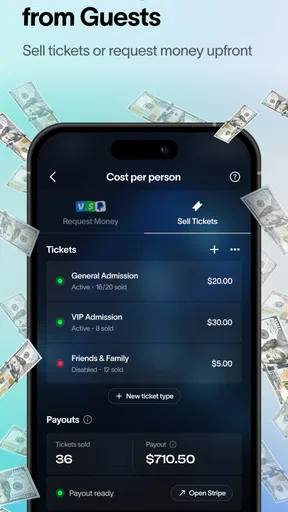
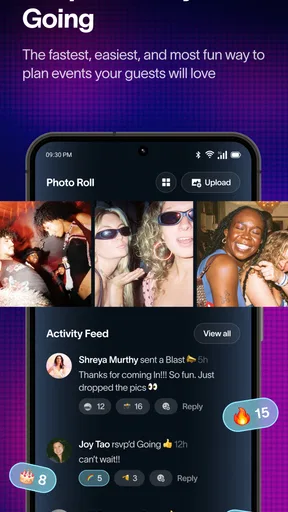
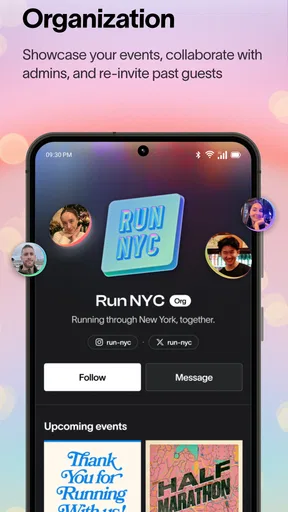

 Analysis by AppCompare
I find Partiful most useful when a gathering needs more structure than a chat thread but doesn’t warrant a formal planning tool. It gives an invitation, the practical details, and responses a shared home, which can spare a host from repeatedly answering the same questions. The payoff is less about elaborate event management and more about making a casual plan feel clear enough that people can actually respond.
Where it fits in the current party-planning mix
Partiful is a free lifestyle app from Partiful, with a 4.9 average from around 19,000 ratings and over 500,000 installs. It’s rated for everyone, and version 3.5.29 is the current release. Those figures suggest a well-used option, but popularity alone doesn’t make it right for every kind of gathering. I’d think of it as a lightweight host-and-guest hub, especially for social plans where the invitation itself should be easy to pass around.
Compared with a basic group text, the main advantage is a single event page that can hold the details and responses instead of scattering them across messages. Compared with a full calendar or project-planning app, it is more centered on the social invitation and less suited to coordinating a complicated schedule or assigning a long list of tasks. That distinction matters: for a birthday dinner, a casual get-together, or a shared celebration, a dedicated invite can feel more welcoming than a calendar entry; for a multi-day event with several moving parts, a spreadsheet or planning tool may still be easier to manage.
A practical workflow for a real gathering
Imagine you’re arranging a weekend potluck. You can make the event page the place guests check for the address, start time, and what to bring, then use the response list to get a rough sense of attendance. Rather than posting each change in several chats, update the event information so everyone has one place to refer back to. The useful habit is to make the invite specific from the start: include the details people are likely to ask about, and keep any last-minute changes concise so the page stays easy to scan.
For a host, that workflow is most helpful when guests are coming from different circles and don’t all know one another. A message in one existing group may miss the people outside it, while a shareable invite gives you another way to reach them. Before sending, I’d check the audience and the event details carefully: invitations are convenient to distribute, but convenience can also make it easy to overlook who has access or whether the information is ready to share.
What I would check before inviting everyone
One practical question is whether every guest will want to use a separate event page rather than reply in the messaging app they already have open. Some people prefer a quick text, and a few may ignore an invitation if it feels like an extra step. I’d use Partiful when keeping attendance visible is worth that small change in habit, and stick with a familiar group chat for a spontaneous plan where a formal RSVP list would add friction rather than remove it.
I’d also avoid treating an RSVP as a promise that can’t change. Plans shift, and the host still needs to communicate clearly when capacity, timing, or arrangements are important. An organized response list helps you see where things stand; it doesn’t replace a final check with guests when the event depends on an exact headcount.
Worth Reading Before You Choose

EA SPORTS FC Mobile 26 Is a Bigger Football Game, but It Takes Time

Flipboard Shows What News Apps Must Do Beyond the Feed

Switching to Android Auto Means Rethinking Your Driving Routine

Google Calendar Makes a Crowded Week Easier to Manage

Ludo King Makes the Most of the Minutes Between Plans

Baby Panda World Brings Quick Play to Modern Phones, but Its Game Library Feels Busy
Who is likely to enjoy it, and who may not
This is a natural fit for people who host often enough to appreciate reusable habits: putting the key details together, sharing one invite, and checking responses without searching through a conversation. It can also work well for a one-off celebration when you want the invite to feel more considered than a plain message. If you’re planning something informal and everyone is already in one active chat, though, a direct message may be faster and easier for the group.
I’d be more cautious about relying on it as the sole organizing system for an event with complex logistics. If you need detailed budgets, vendor coordination, intricate schedules, or task ownership, a dedicated planning method will give you more room to organize those responsibilities. Partiful’s appeal is its social focus; asking it to replace every tool a large event might need would be the wrong test.
A Party Planner’s Dream
First off, Partiful is designed to make your life easier. The app has a sleek, user-friendly interface that makes creating and managing events a breeze. When you open the app, you’re greeted with a clean layout that’s intuitive and straightforward. No more fumbling around trying to figure out where to start.
Creating the Perfect Invite
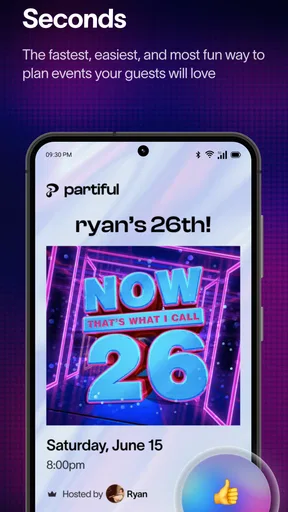
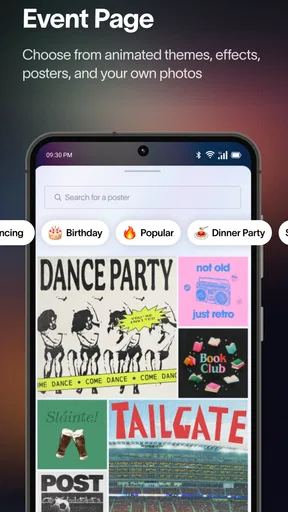
Creating an invite is ridiculously easy. You can customize everything from the event title to the background image. They offer a bunch of fun templates that are sure to catch your guests' eyes. Plus, you can add all the important deets like location, time, and any special instructions.
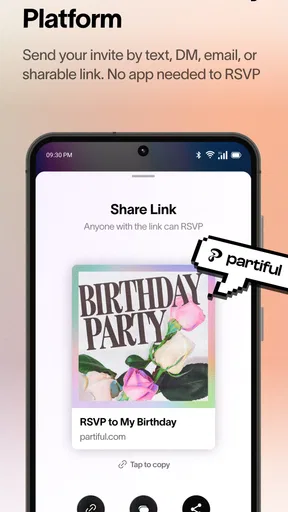
One thing I loved about Partiful is the ability to send invites directly via text or email. It’s integrated with your contacts, so it’s just a tap and send situation. You can even share a link on social media platforms if you’re going big and inviting a crowd.
RSVP Management Made Easy
Now, this is where Partiful really shines. Managing RSVPs is usually a nightmare, but not with this app. You can track who’s coming, who’s on the fence, and who’s not. No more chasing down friends for a simple yes or no.
If you need to remind those ‘maybe’ folks to make up their minds, you can send gentle nudges without seeming pushy. There’s something satisfying about seeing that guest list fill up!
Stay Organized with Event Details
What’s a party without all the crucial details? Partiful allows you to keep everything in one place. You can add notes about what guests should bring, parking info, or even dress codes. It’s like your own personal party assistant.
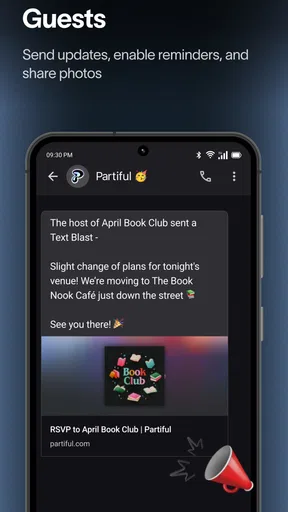
And if plans change (because let’s be real, they always do), you can easily update the event details and notify everyone in one go. No more mass texts or chaotic group chats!
Engage Your Guests
This app isn’t just about logistics; it’s about engagement, too. You can chat with your guests directly through the app, share updates, or even start a countdown to get everyone hyped for the big day. It’s these little touches that make a party memorable.
Plus, you can ask for song requests or food preferences to make sure everyone has a good time. It’s like having a digital party planner in your pocket!
Security and Privacy
In today’s digital age, privacy is a big deal, and Partiful takes it seriously. You have control over who sees your event and who can invite others. Your guest list is private, and they don’t share your info with third parties. It’s peace of mind for you and your guests.
You can also set events to private or public depending on how exclusive you want to keep things. It’s all about giving you control over your event.
Keeping the invitation useful without overcomplicating it
For a smoother invite, I’d put the most important information near the top of the event details: what the gathering is, when it starts, where to go, and anything guests need to bring or know before arriving. A playful template can make the invitation feel personal, but clarity is what saves time later. If the location is hard to find or the plan depends on a detail such as parking, spell that out rather than assuming everyone will ask.
It’s also worth deciding how you want to handle guests who haven’t responded. A friendly reminder can help, but it’s best to give people a clear point by which an answer is useful. That makes follow-up feel practical rather than like repeated pressure. For food preferences or song requests, ask only when you’ll use the answers; collecting responses without acting on them adds effort for guests without improving the gathering.
What the version history can and cannot tell you
The app was released on May 12, 2024, and the current version is 3.5.29. That gives a useful snapshot of its place in the product’s life, but a version number by itself doesn’t explain which features changed or how a particular update affects a person’s routine. I wouldn’t assume that a newer release means every workflow has been redesigned. The sensible approach is to judge the app by the current experience you need: creating an invite, getting responses, and keeping event information together.
For people already using it, the practical question is whether the latest version continues to make their usual event tasks straightforward. If you’ve built a routine around sending invites and checking attendance, focus on whether those steps still feel clear after updating rather than expecting a release number to promise a specific improvement. For someone new, there’s little reason to learn a change log before trying a simple event; start with a low-stakes gathering and see whether guests respond comfortably.
Small trade-offs that matter on event day
A dedicated event page reduces repeated explanations, but it also creates one more place guests may need to check. I’d still send a brief personal message to anyone whose attendance is essential, especially if they’re not the sort of person who reliably follows app invitations. That doesn’t defeat the purpose of organizing the event in one place; it catches the human edge cases that no RSVP list can resolve on its own.
Likewise, a public-facing sharing option can be useful for a broad gathering, while a private event is a better instinct for plans meant for a defined group. Before distributing an invite widely, make sure the details and intended audience match. The host’s convenience should not come at the expense of sharing a location or guest information more broadly than intended.
Choosing the right tool for the size of the plan
For a birthday, game night, dinner, or informal celebration, I’d choose Partiful when the guest list is spread across several circles and I want the same details and RSVP status visible to everyone. It’s particularly handy when the event may change and I don’t want to chase down each person with a separate correction. For a very small last-minute meetup, a text thread is probably simpler. For a large event with several organizers and interdependent tasks, I’d pair the invite with a more structured planning tool instead of expecting one app to handle everything.
The app is free, which makes trying it for a single occasion an easy decision if you’re curious. Still, “free” doesn’t mean every guest will prefer this way of responding. I’d make the invitation easy to understand even for someone who hasn’t used the app before, and keep a fallback way to reach people if a response matters. Its best role is to make social coordination lighter, not to force every guest into the same digital routine.
Final Thoughts
All in all, Partiful is a must-have app for anyone who loves hosting parties but hates the hassle of planning. It’s like having a personal assistant that handles all the nitty-gritty details while you focus on having a good time.
If you’re ready to take your party planning to the next level, give Partiful a try. It’s free to download, and trust me, once you use it, you’ll wonder how you ever planned events without it. Happy partying!
Pros
- User-friendly interface for easy event creation.
- Customizable templates for unique invitations.
- Seamless RSVP tracking and notifications.
- Integration with calendars for scheduling ease.
- Share invites via multiple platforms effortlessly.
Cons
- Limited theme options for niche events.
- No offline mode for invite management.
- Occasional sync issues with calendar apps.
- Requires internet for RSVP updates.
- Some features locked behind premium access.
FAQs for Partiful: Party Invite Maker
What is Partiful: Party Invite Maker, and how does it work?
Partiful: Party Invite Maker is an app designed to simplify the process of creating and managing party invitations. Users can design personalized invites, track RSVPs in real-time, and send reminders to guests. The app offers various templates and customization options to suit different party themes and styles, making it easy to create engaging invites that stand out.
Is Partiful available on both Android and iOS devices?
Yes, Partiful: Party Invite Maker is available for download on both Android and iOS platforms. Users can find the app in the Google Play Store and the Apple App Store, ensuring compatibility with a wide range of devices. This cross-platform availability makes it accessible for most users, regardless of their preferred operating system.
Does Partiful offer any free features, or is it a paid app?
Partiful offers both free and premium features. Users can access basic invitation templates and RSVP tracking for free. However, for advanced customization options, premium templates, and additional features like ad-free usage, users might need to subscribe to a paid plan. This flexibility allows users to choose based on their needs and budget.
Can I manage guest lists and RSVPs efficiently with Partiful?
Absolutely, Partiful provides robust tools for managing guest lists and tracking RSVPs. Users can easily add or import guest contacts, send invites, and receive RSVP responses in real-time. The app also offers features to send reminders to guests who haven’t responded, ensuring a smooth planning process for any event.
Are there any privacy concerns with using Partiful?
Partiful takes user privacy seriously and includes settings to control who can view and respond to your invitations. The app ensures that guest information is protected and not shared without consent. Users are encouraged to review the app’s privacy policy to understand how their data is handled and what measures are in place to safeguard their information.


